 Read Aloud Extension
How to Read a PDF Aloud in Chrome
Listen to a PDF that is open in a tab, behind a link, or saved on your computer.
Chrome opens PDFs in its own viewer. Most read-aloud extensions stop working there, because the text sits inside that viewer where extensions cannot reach it. Read Aloud Extension solves this with a reader of its own: it takes the text out of the PDF, lays it out as paragraphs and reads it like any web page.
Read a PDF that is open in Chrome
- Open the PDF in Chrome as you normally would.
- Click the Read Aloud icon in the toolbar and press Open this PDF in the reader. If you don't see the icon, it is in the puzzle-piece Extensions menu next to the address bar.
- The PDF opens in a new tab as plain paragraphs. Click the icon again and press Read this page, or hold Alt and click the paragraph you want to start from.
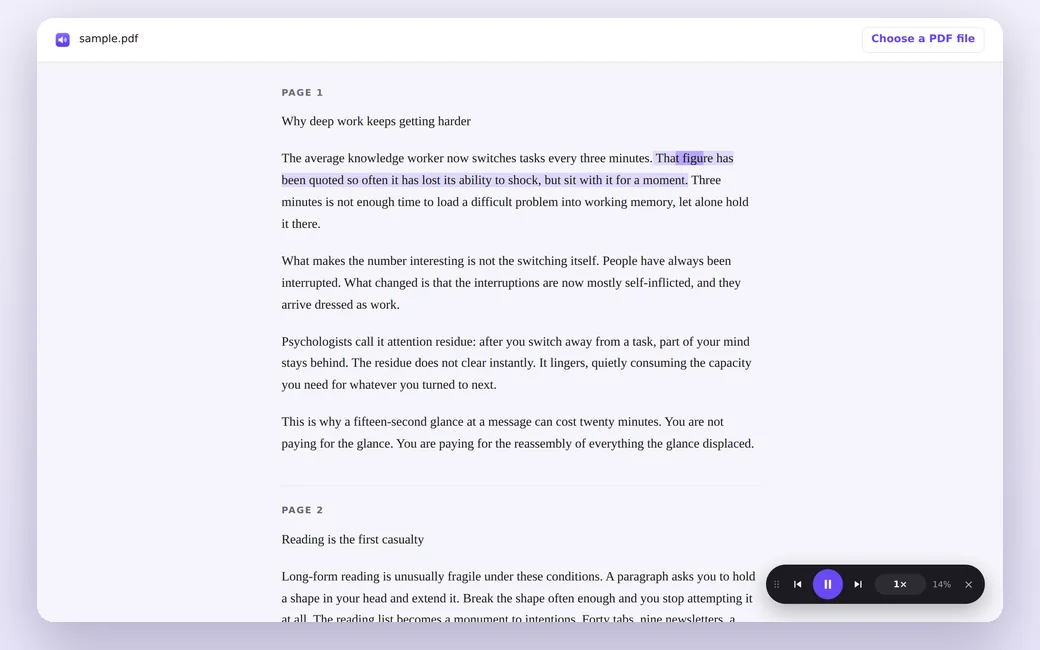
The reader keeps page numbers on screen as dividers but does not read them out, so a long document is not interrupted by "page 7".
Read a PDF from a link
You don't have to open the file first. Right-click a link to a PDF and choose Read this PDF aloud. The reader opens with that document loaded.
Read a PDF saved on your computer
Open the reader from the toolbar and press Choose a PDF file. The file is processed in your browser with a local copy of pdf.js and is never uploaded anywhere.
You can also drag the file into Chrome. In that case Chrome needs one permission first: open chrome://extensions, find Read Aloud Extension, click Details and turn on Allow access to file URLs.
Read Aloud Extension is free and needs no account.
Add to ChromeWhile it reads
- The sentence being spoken is highlighted and the current word is marked.
- The buttons next to play jump to the previous or next paragraph.
- Click the speed button to step through speeds from 0.75× to 3×, or scroll over it to go up or down.
- The same voices and highlight colors you set for web pages apply here too.
What it cannot read
Scanned PDFs. A scan is a picture of a page with no text underneath. The reader tells you so with the message "This PDF has no text layer". To listen to a scan, run it through an OCR tool first so it gets a text layer, then open the new file.
Complex layouts. Text in multiple columns, tables and footnotes can come out in an unexpected order, because a PDF stores positioned fragments of text rather than paragraphs.
Other ways to hear a PDF
If you use other software, two programs have read-aloud built in:
- Microsoft Edge has a Read aloud button in its own PDF viewer.
- Adobe Acrobat Reader can read documents with View, Read Out Loud, Activate Read Out Loud. In newer versions the View menu sits under the main menu.
Both work well if that program is already where you open PDFs. Read Aloud Extension is for staying in Chrome with the same player you use on web pages.
Questions
Is my PDF uploaded anywhere?
No. The document is opened and processed in your browser. The extension has no server to send it to.
Does it work offline?
Yes, if you choose a voice without the ☁ mark. Cloud voices need a connection.
Can it read password-protected PDFs?
Not directly. The reader cannot ask for a password, so unlock the file and save a copy without one, then open that copy.
Try it on the next PDF or article you open.
Add to Chrome